
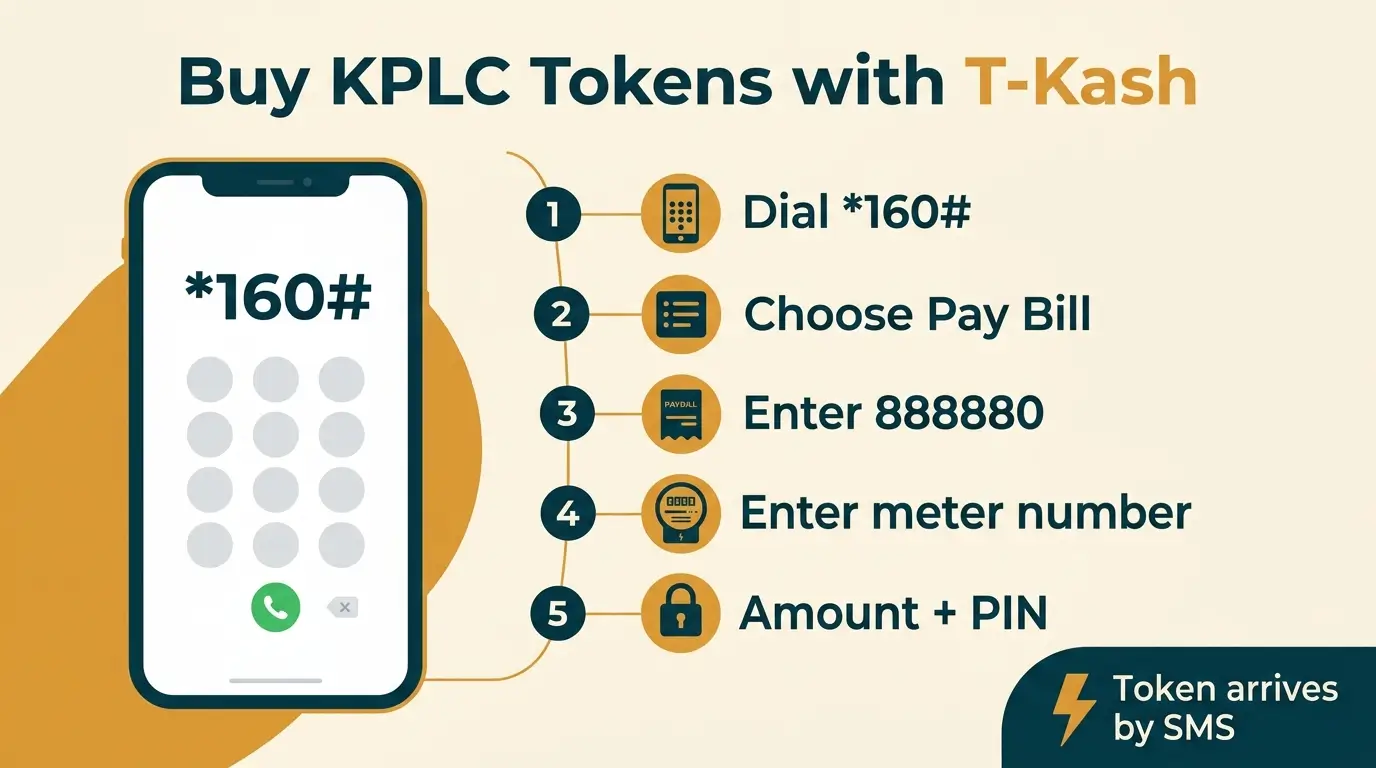
To buy KPLC prepaid tokens with T-Kash, dial *334# on your Telkom line, choose Pay Bill, enter paybill 888880, then your prepaid meter number, the amount and your T-Kash PIN. KPLC sends the token by SMS, and you key it into the meter.
One caveat belongs up here and not at the bottom. I could not find KPLC or Telkom naming T-Kash as a token channel, so this route works through interoperability with the M-Pesa paybill. If you have never done it, start with a small amount and confirm the token arrives.
Most guides to buying KPLC tokens assume you have M-Pesa, and a few cover Airtel Money. T-Kash users get left out. The full steps follow, and the meter number gets its own section further down because that is where people go wrong.
Step by step
- Dial *334# on your Telkom line, or open the T-Kash app.
- Choose Pay Bill.
- Enter 888880 as the business number. That is KPLC's paybill for prepaid tokens.
- Enter your prepaid meter number as the account number.
- Enter the amount you want to spend, in shillings.
- Enter your T-Kash PIN and confirm.
- Wait for the SMS from KPLC with your token, a 20-digit number. Key it into the meter keypad.
Menu wording changes, and I could not check the live T-Kash screens myself. If yours differs a little from the list above, look for the Pay Bill option and use 888880. The paybill and the meter number are what matter.
How T-Kash reaches a KPLC paybill
Since 2018, M-Pesa, Airtel Money and T-Kash have been interoperable under a Central Bank of Kenya framework. In practice, a paybill published on one network can be paid from a wallet on another. That is how a T-Kash wallet reaches KPLC's 888880.
It is not the same as a direct deal. When Airtel and Kenya Power announced a partnership in 2023, Airtel Money got its own KPLC entry on its menu, and Airtel Money appears on KPLC's own list of payment channels. I found no matching entry for T-Kash. That does not prove it fails. It does mean you should not assume the experience is identical.
What you need before you dial
A Telkom Kenya line registered in your name, a registered T-Kash wallet, your T-Kash PIN, and enough balance for the token and any fee. You register at a Telkom shop or with an authorised T-Kash agent, with your national ID or passport. Your prepaid meter number is printed on the meter and is usually 11 digits. Read it off the meter.
The meter number is the step that matters
For my money, this is the one place to slow down. The account field takes the meter number. It does not take your phone number, your ID number or the KPLC account number from a postpaid bill. A token bought against the wrong meter number loads onto that meter, not yours, and getting it back means applying to KPLC for a reallocation.
Check the digits twice before you enter your PIN. It takes five seconds.
Prepaid and postpaid use different paybills
Prepaid tokens go to 888880, with the meter number as the account. Postpaid bills go to 888888, with the account number from your monthly bill. If your meter takes tokens, you want 888880.
What it costs
I could not find a published fee for paying a paybill from T-Kash, and I would rather say so than guess. Telkom's published T-Kash tariff I found covers sending money, which is a separate charge. Look at the fee on the confirmation screen before you accept it.
When the token does not arrive
A missing token is usually a late SMS and not lost money. Give it a few minutes. Then try these in order:
- Dial *977#, KPLC's own USSD code, and look for your last tokens. The myPower app shows the same history.
- Find the T-Kash confirmation SMS and note the transaction ID. Contact Telkom through its official channels with it.
- If Telkom confirms the payment went through, take the same transaction ID to Kenya Power customer care.
Do not delete the confirmation SMS until the token is in your meter. It is your receipt.
Buy only from authorised channels
KPLC said in a notice that took effect on 1 September 2022 that prepaid tokens may be bought only through authorised channels. The list was paybills 888880 and 888888, the *977# code and KPLC banking halls, and the notice added that no third-party agent is authorised to sell tokens on its behalf. When you pay from T-Kash you are paying KPLC's own paybill, not a vendor. That is the safe way to do it.
I would not buy from anyone outside that list, however good the discount sounds.
Keep a small reserve of units too. In May 2024 KPLC told customers to buy enough tokens in advance before a system upgrade took vending offline for about a day. A meter that runs out during a window like that is a bad way to find out how much power you use.
Other ways to buy the same token
T-Kash is one route among several. You can use M-Pesa paybill 888880, pay with Airtel Money on *334#, use Equitel on *247#, or dial *977# directly. The token is the same whichever route you take. Only the payment path differs.
Frequently asked questions
What is the T-Kash code for buying KPLC tokens?
Dial *334#, choose Pay Bill and enter 888880.
Do I need M-Pesa to buy tokens with T-Kash?
No. You pay from your T-Kash wallet. The paybill number is the same one M-Pesa users type.
Can I buy tokens with T-Kash on a basic phone?
Yes. *334# is a USSD code and works on any handset. The T-Kash app is optional.
Which meter number do I enter?
The one printed on the prepaid meter, usually 11 digits. Not your phone number and not a postpaid account number.
Disclaimer: mobilemoney.co.ke is independent and not affiliated with Safaricom, Telkom Kenya, or Airtel Kenya. It does not process payments. All content is subject to verification — confirm transaction details and charges with the respective provider before acting.